
Capture ID details, structured for entry
Plustek AI captures selected fields from identification documents - document number, expiry, name and date of birth - into structured data for fast, accurate entry into your systems.
Selected ID fields, captured and structured
Document number
The ID / licence number captured cleanly.
Expiry date
Validity dates read for your records.
Name
Cardholder name extracted as structured text.
Date of birth
Selected personal fields captured for entry.
Reviewable results
Recognized fields stay reviewable before use.
Into your system
Fast, accurate data entry - no manual typing.
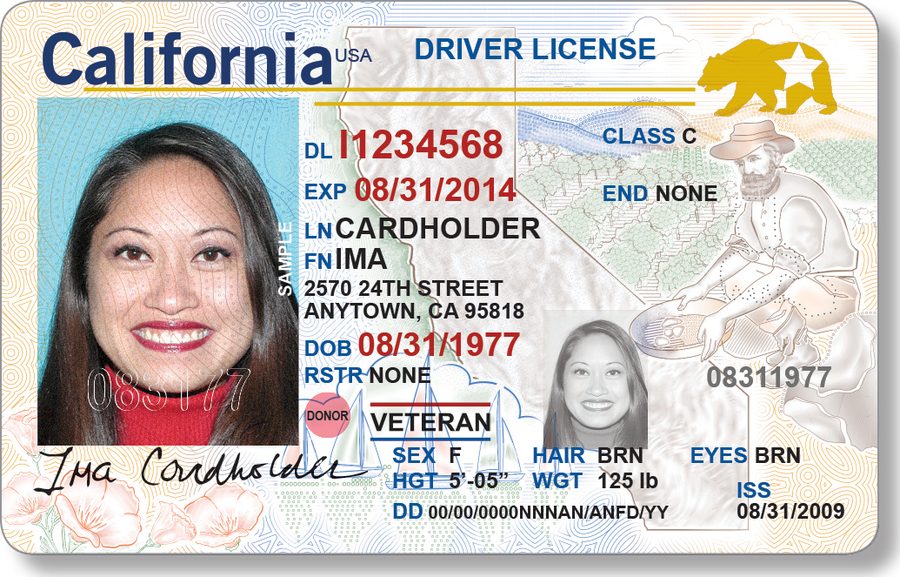
Selected fields, captured cleanly
Identification documents come in many layouts, and you usually only need a few fields from each one. Plustek AI recognizes the selected fields you choose and keeps the results reviewable - so data entry is fast and accurate.
- Recognizes fields across many ID layouts
- Captures only the fields you choose
- Results stay reviewable before entry
- Can run on-premise, data stays on-site
ID document capture, answered
Which fields can Plustek AI capture from an ID?
The selected fields you need for data entry - document number, name, date of birth and expiry date - captured as structured text you can review.
Does it work across different ID layouts?
It reads the fields in context rather than relying on one fixed template, so it can recognize selected fields across a range of identification document layouts.
Can ID data stay inside our network?
Yes. Plustek AI can be deployed on-premise as an AI Box, so documents and the captured data can remain inside your own environment.
Test it on your ID documents
Send us a document and the Plustek team will run it through - you’ll see exactly what comes out.